Accounts, inventory and GST at keyboard speed.
Xegality's own accounting app for Indian businesses and CA offices.
The keys you already know, offline on Windows, macOS and Linux, the same app in your browser, and a phone layout for the owner. Bring your company over from Tally in one go.
Works with your Xegality account — sign in or create one for free. Then Practice company opens a company with about 300 invented vouchers to try every screen.
- Windows · macOS · Linux
- xegality.com/books
- Phone layout
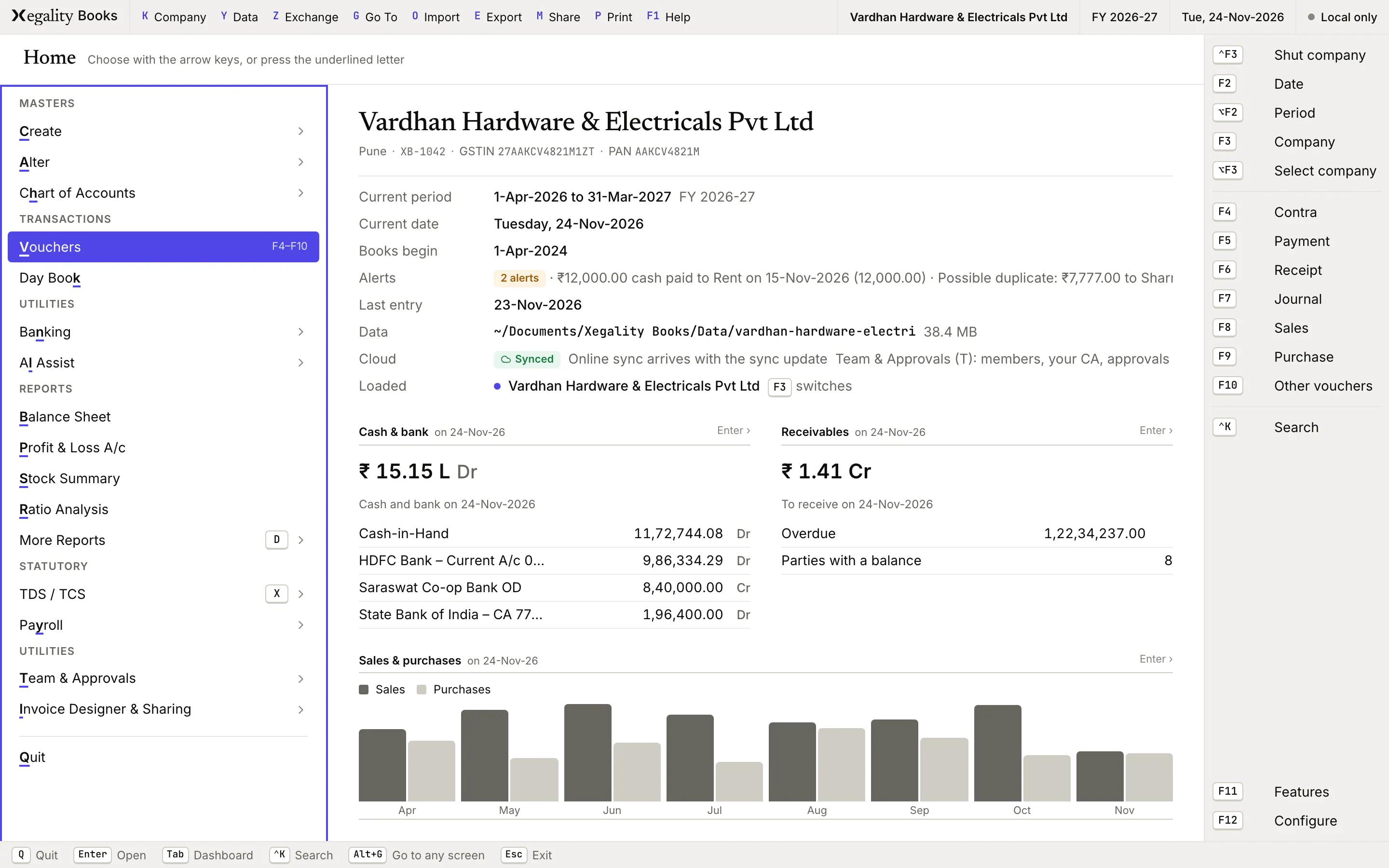
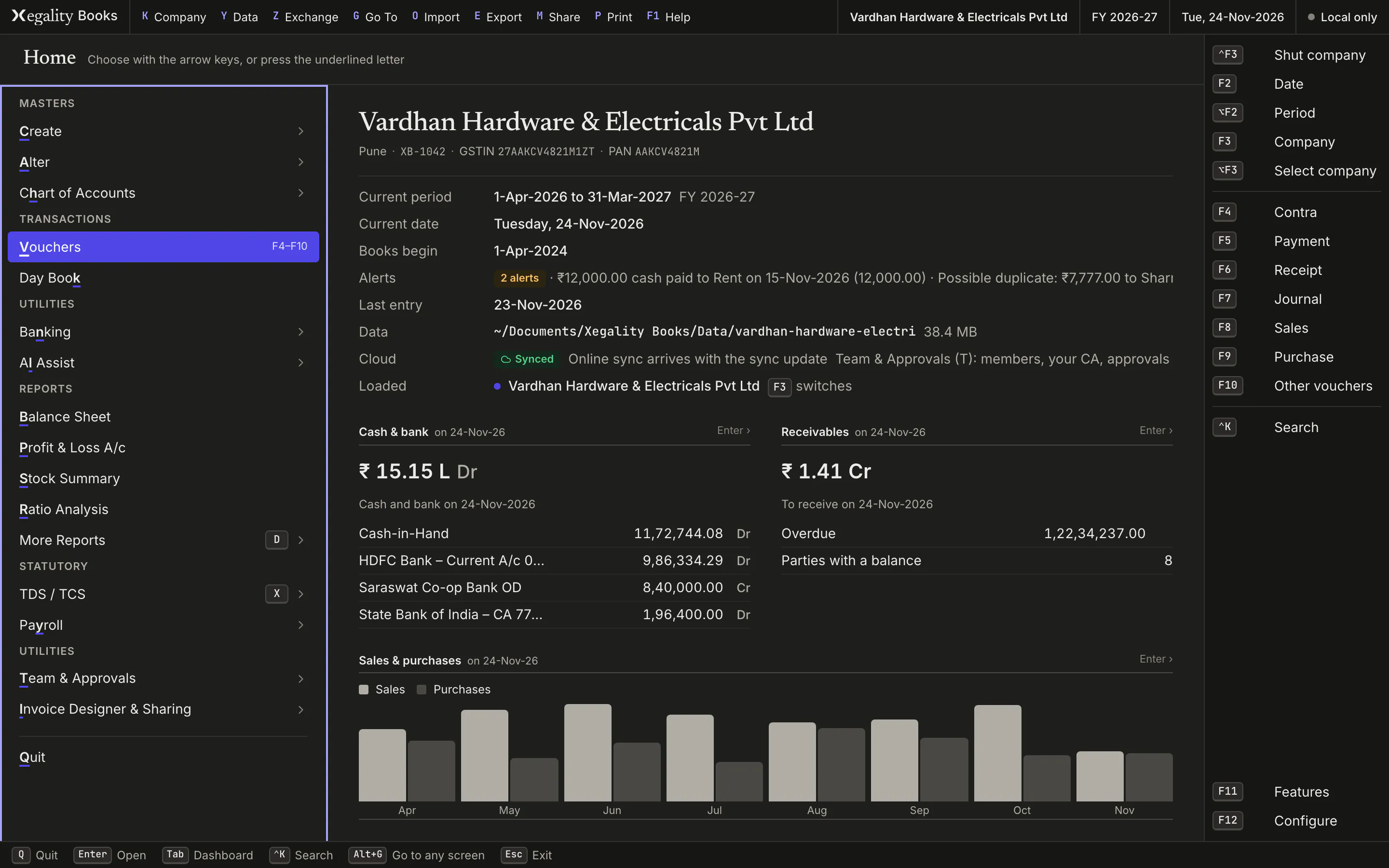
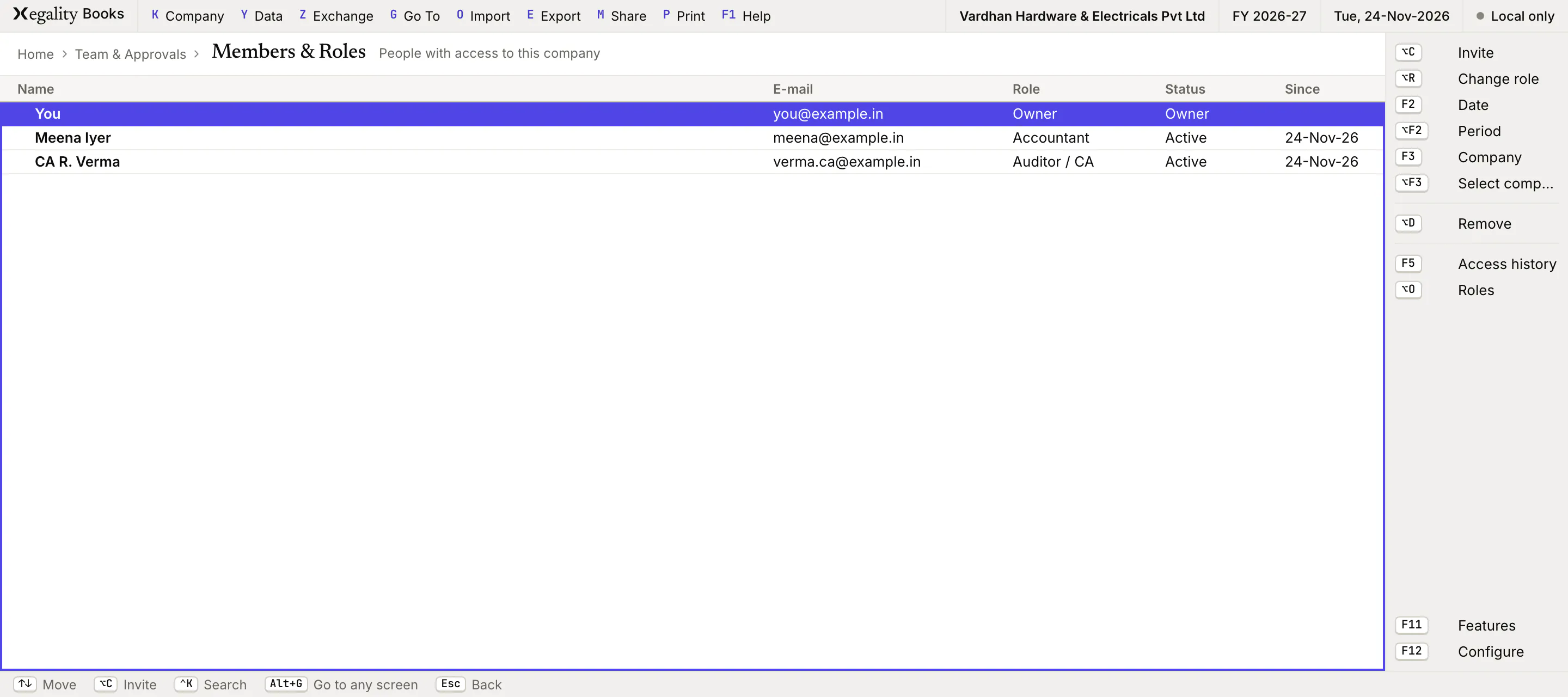
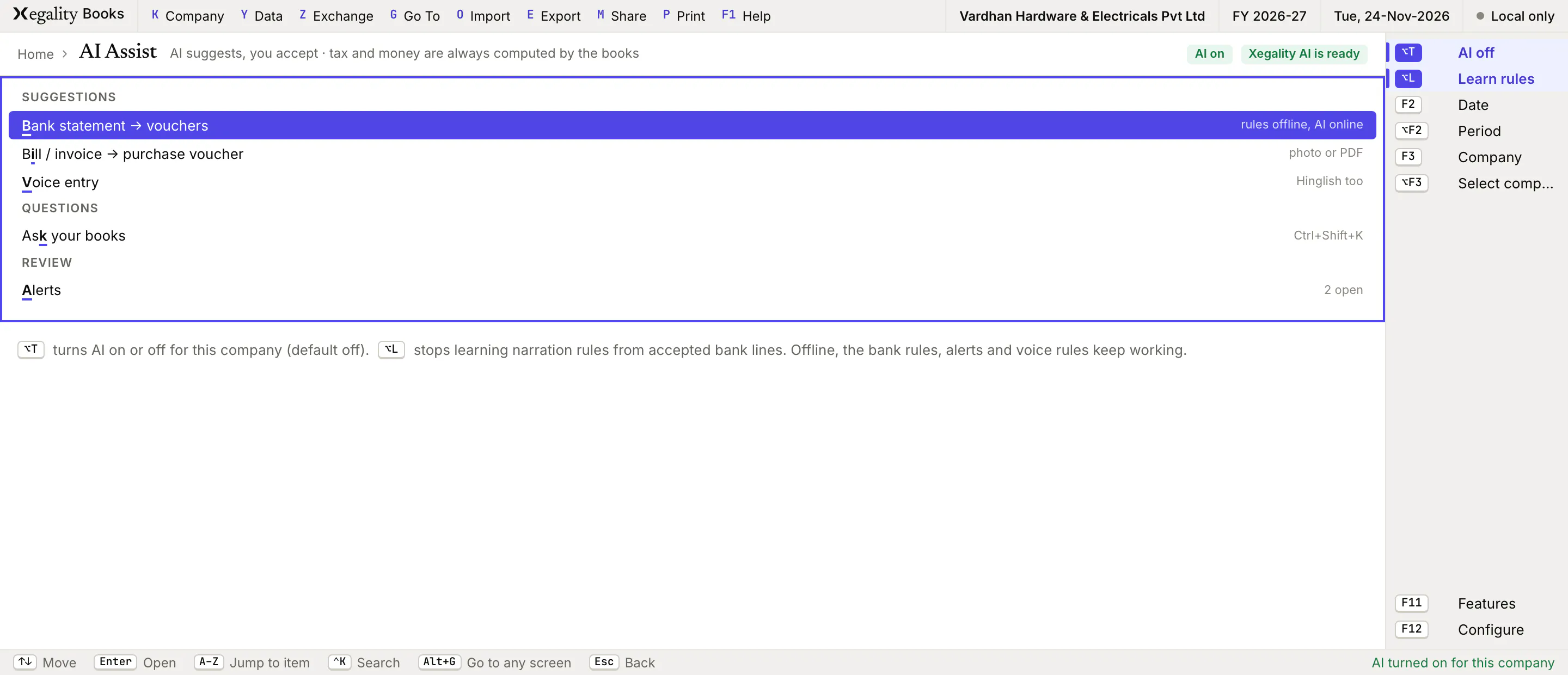
Real screens of Xegality Books. The company, people and figures in every screenshot on this page are invented.
Your fingers already know it.
F8 for a sale, Ctrl+A to save, Esc to go back. If you have done accounts on an Indian desktop package, you can enter vouchers in Books on the first day — and anyone new gets a two-minute guided tour.
- F4Contra
- F5Payment
- F6Receipt
- F7Journal
- F8Sales
- F9Purchase
- Ctrl+AAccept and save
- EscBack
- EnterDrill down
- Alt+GGo to any screen
- Ctrl+KSearch everything
- F2Change date
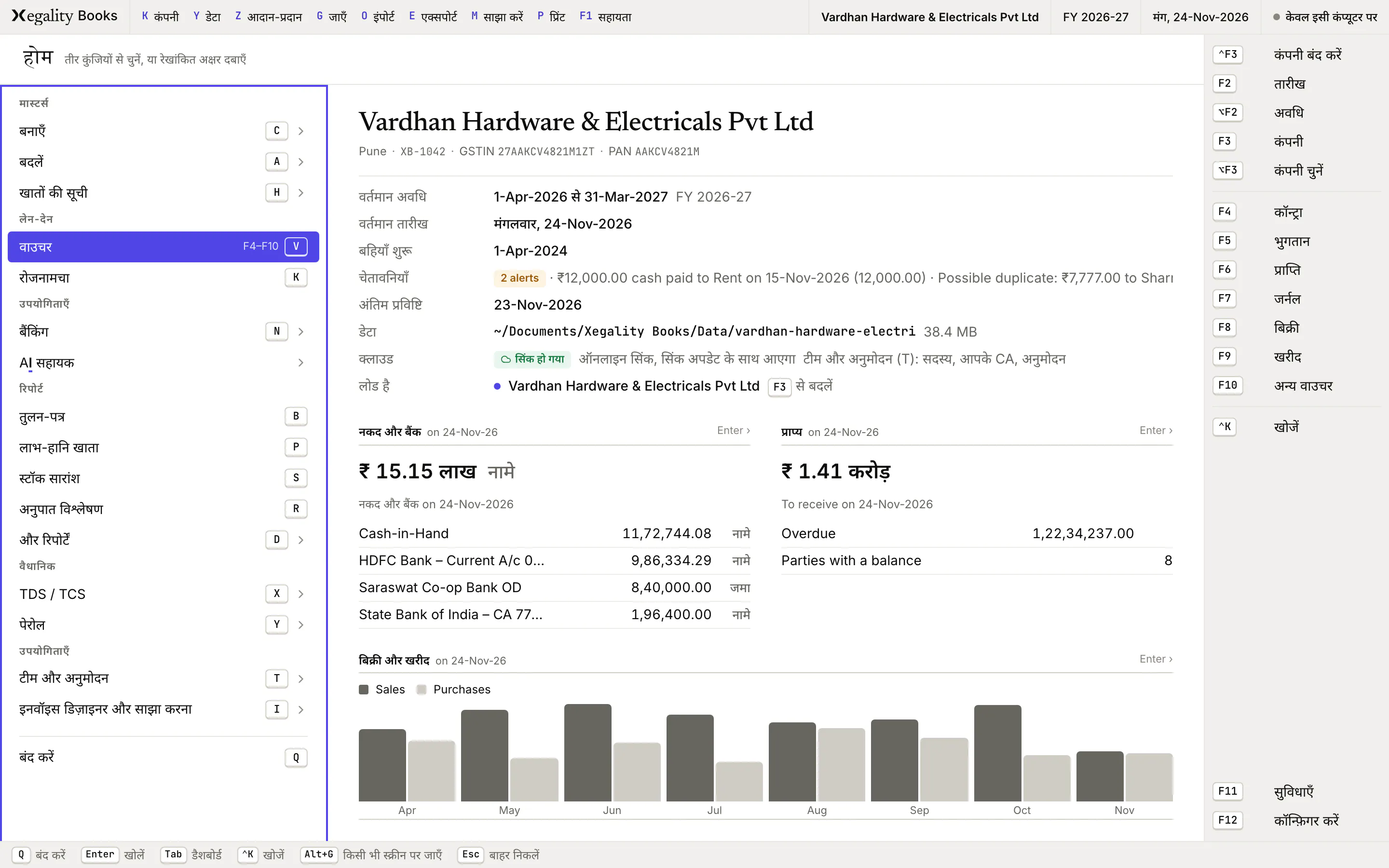
- Home is a letter menu (C Create, A Alter, K Day Book, B Balance Sheet, S Stock Summary, D More Reports …) with a live dashboard beside it: cash and bank, receivables, sales against purchases.
- Enter on any report line drills down, level by level, to the voucher itself. Esc walks back.
- Alt+F5 Debit Note, Alt+F6 Credit Note, Alt+F7 Stock Journal, Alt+F8 Delivery Note, Ctrl+F4 Payroll. F11 switches features on, F12 sets options.
- Ctrl+K finds ledgers, items, parties and vouchers by number, amount, narration or party name.
- Mouse and touch work everywhere too. Every button shows its key, so the mouse teaches the keyboard.
- Messages say what went wrong and how to fix it, in plain words — never an error code.
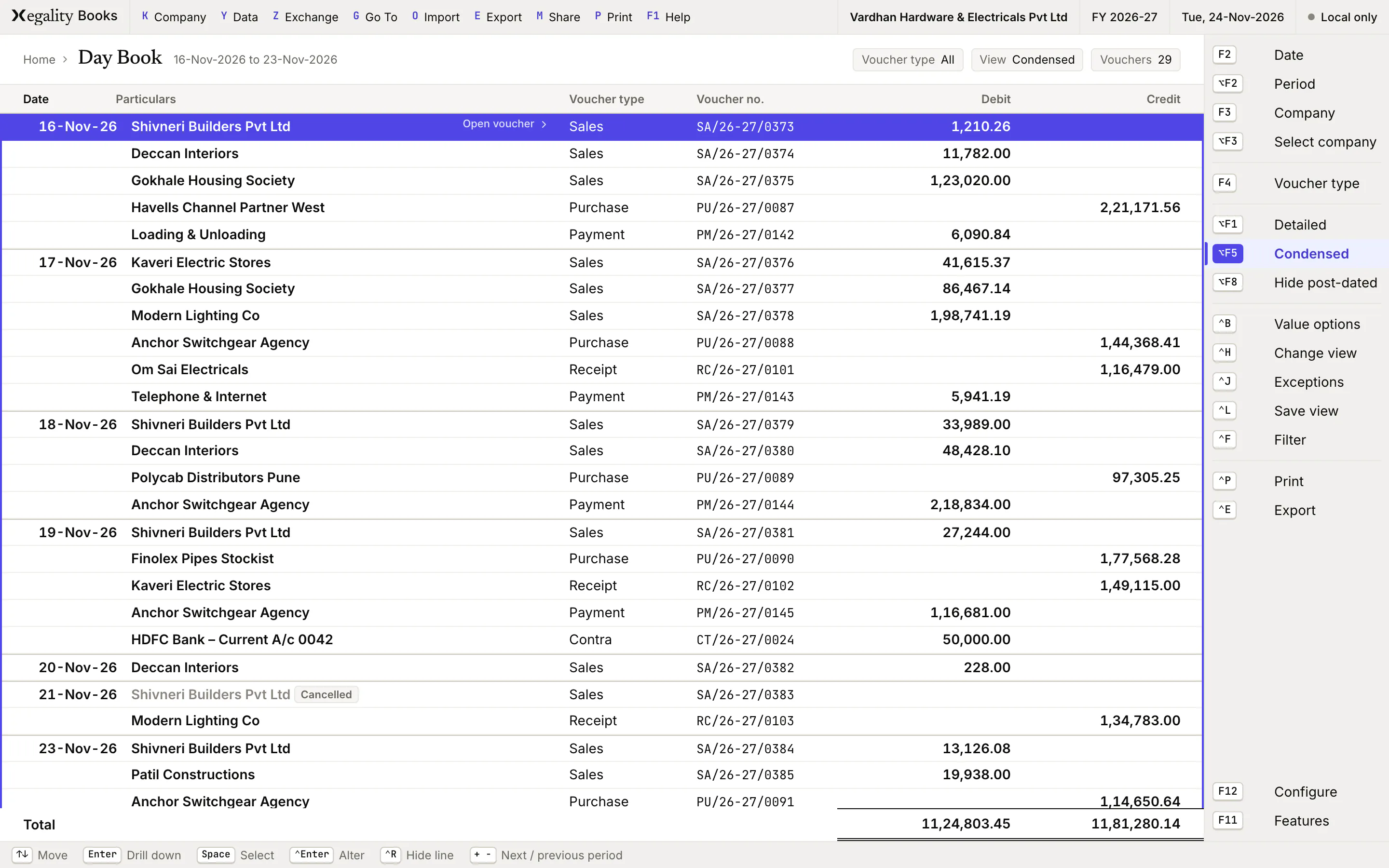
Every voucher, every book, every statement.
Enter it once and every report is up to date: from the Day Book to the Balance Sheet, each line drills down to the voucher behind it.
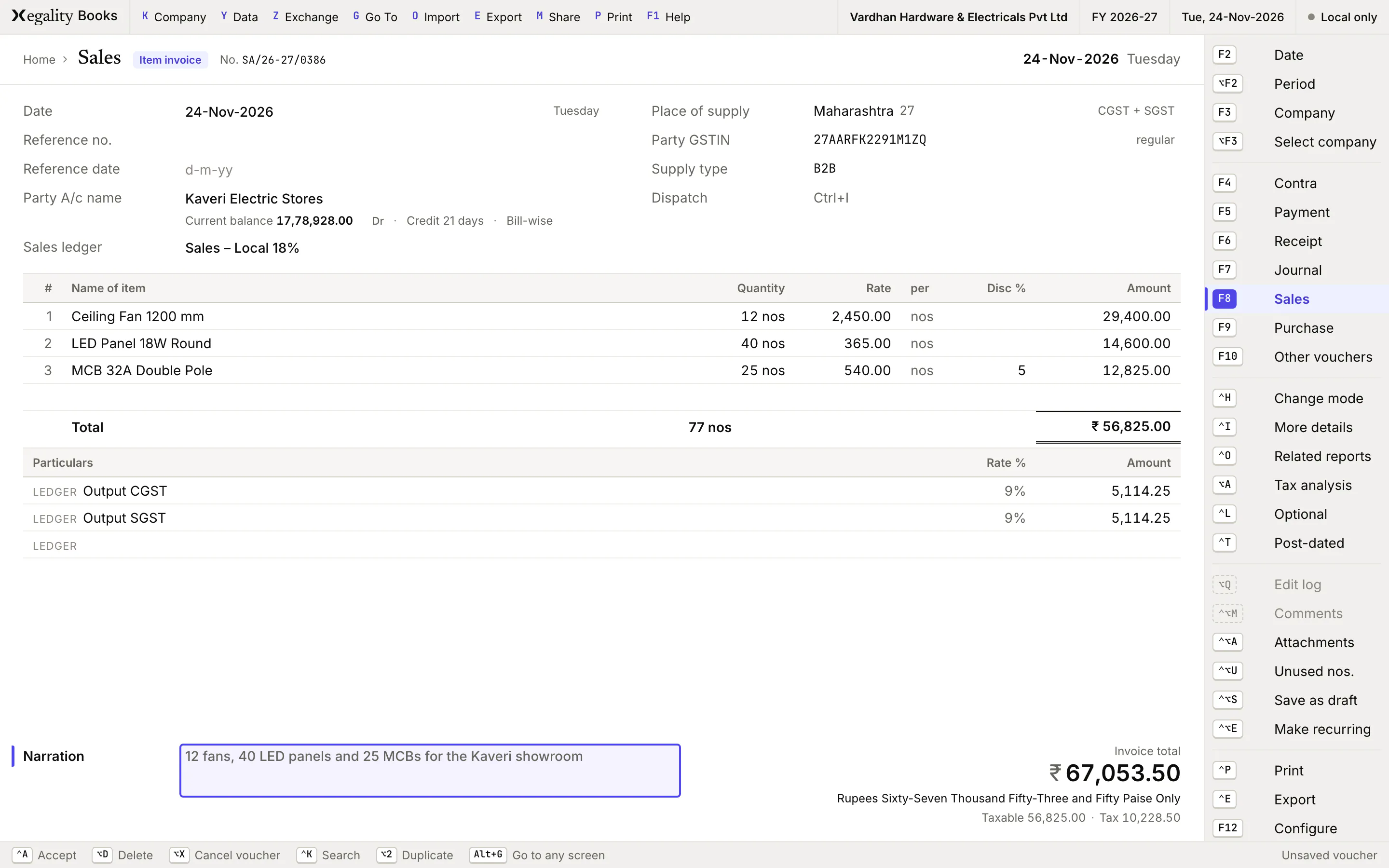
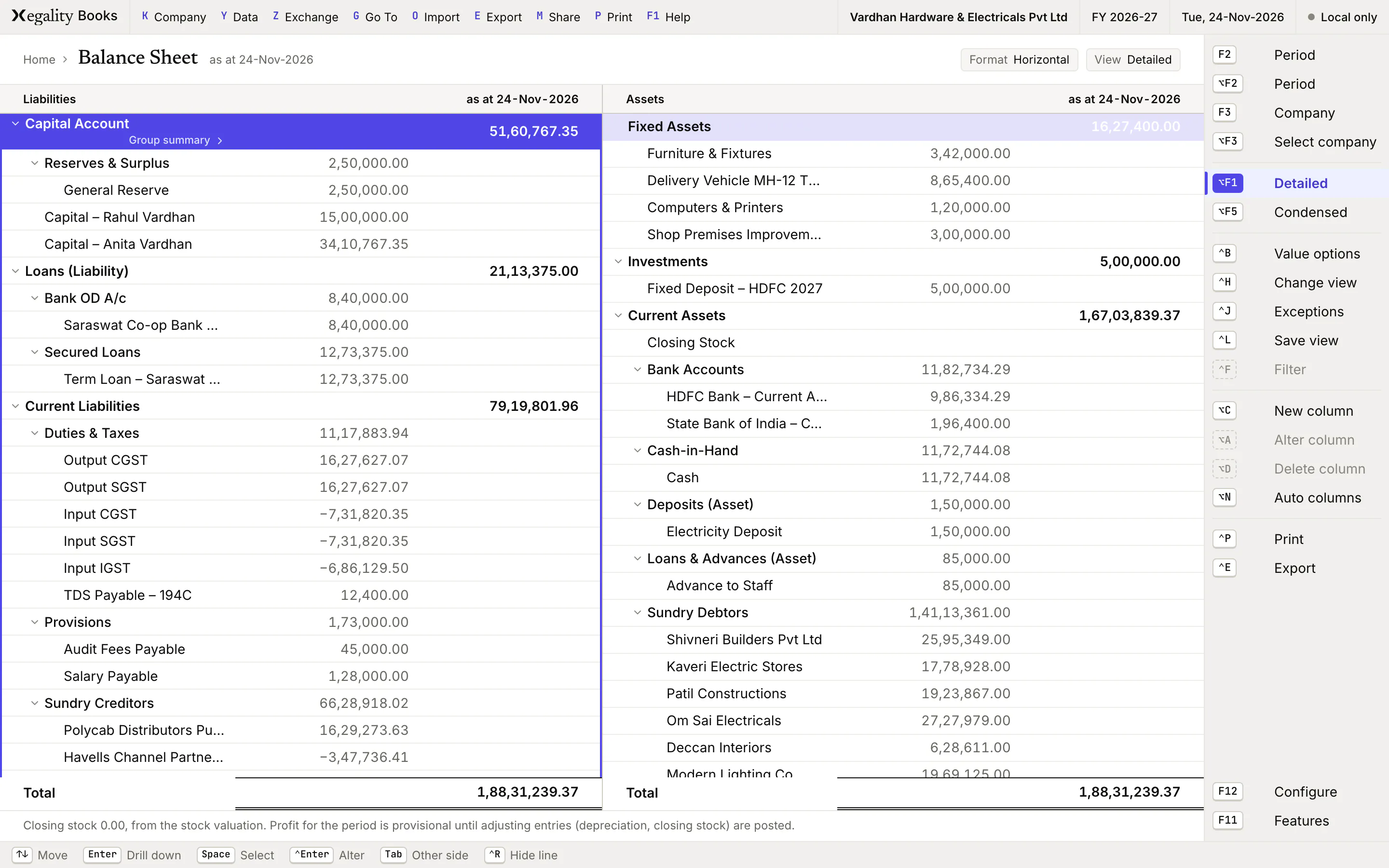
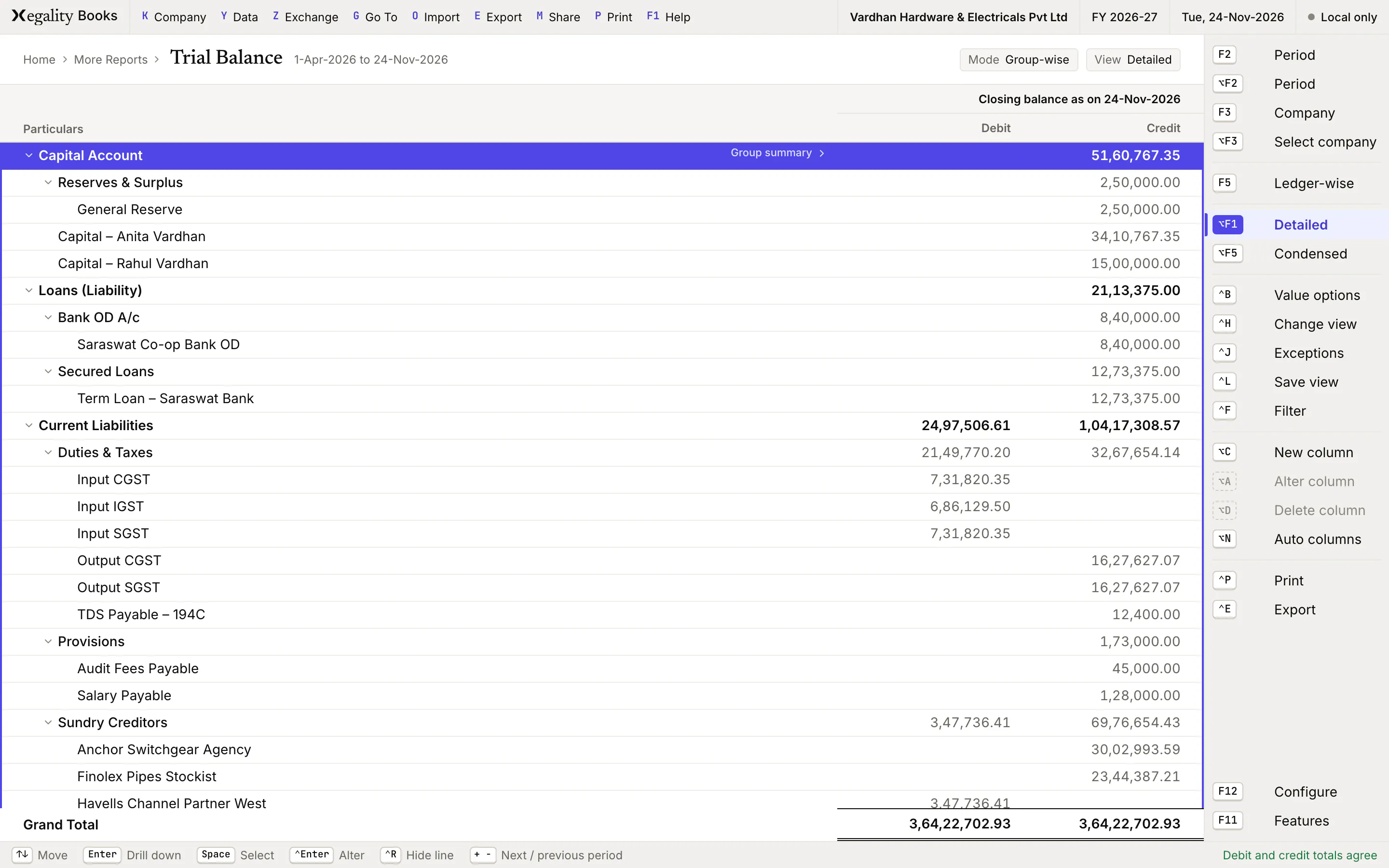
- Contra, payment, receipt, journal, sales, purchase, debit and credit notes, as accounting or item invoices
- Bill-wise details on every party line: new reference, against reference, advance or on account, with credit days
- Day Book, ledgers, cash and bank books, registers, columnar Day Book, Trial Balance, Profit & Loss, Balance Sheet
- Ratio analysis, cash flow and funds flow, outstanding receivables and payables with ageing, party statements
- Several years in one company: no year-end split, opening balances carry forward on their own
- Recurring vouchers for rent, EMIs and salary, drafts, optional and post-dated vouchers, attachments on any entry
- Excel and CSV import for masters, opening balances and vouchers, with a column-mapping screen and a dry run
- Report columns (Alt+C), Detailed or Condensed views, saved views, Excel export and a report builder
Stock that matches the shelf.
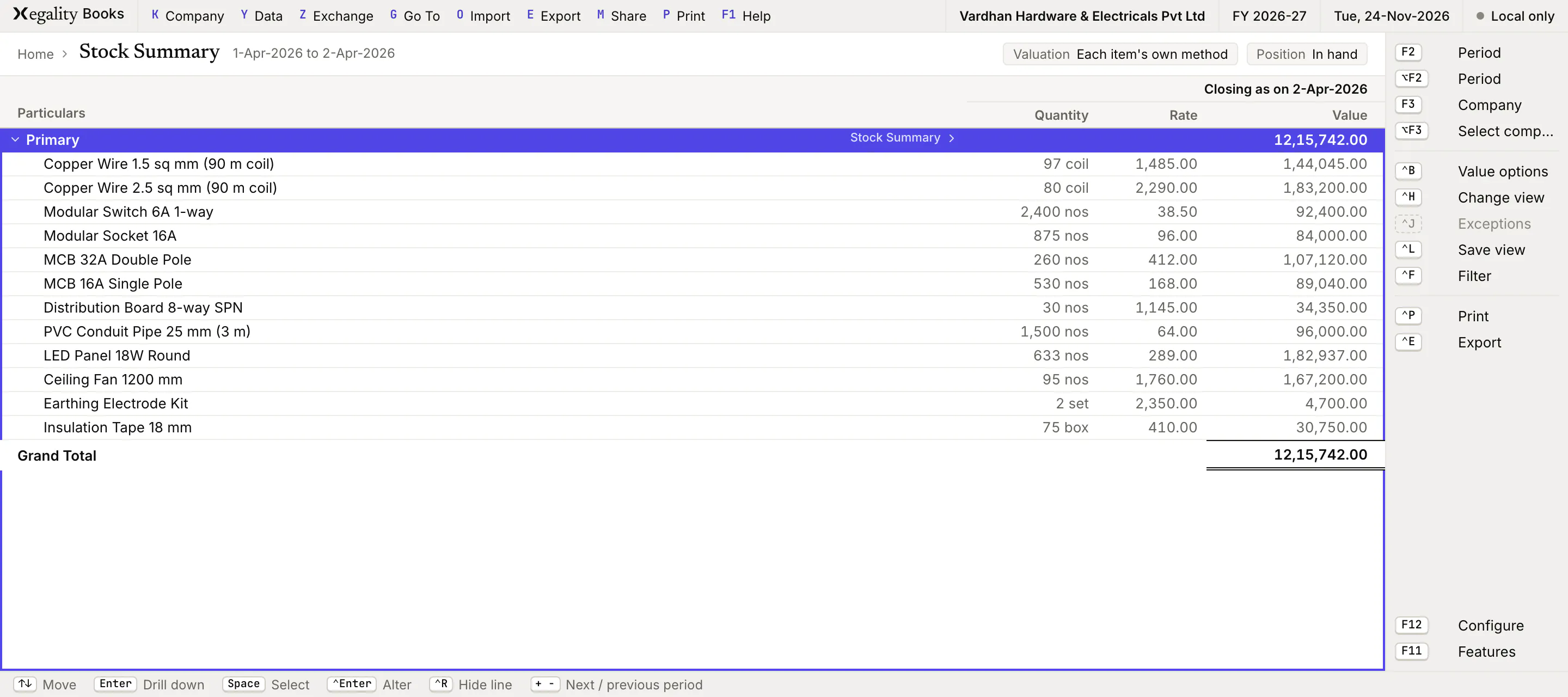
Items move with your invoices, notes and stock journals, godown by godown and batch by batch, and the value follows the method you pick for each item.
- Stock groups, categories, simple and compound units, godowns in a tree, opening stock by godown and batch
- Batches with manufacturing and expiry dates, and a check when an expired batch goes out
- Bills of materials and the manufacturing journal, with co-products, by-products and scrap
- Sales and purchase orders with pending quantities, delivery and receipt notes, rejections in and out
- Job work out and in, physical stock counts, reorder levels, price levels and dated price lists
- Nine valuation methods: average cost, monthly average, FIFO and LIFO (annual or perpetual), last purchase cost, standard cost and zero cost
Returns straight from your vouchers.
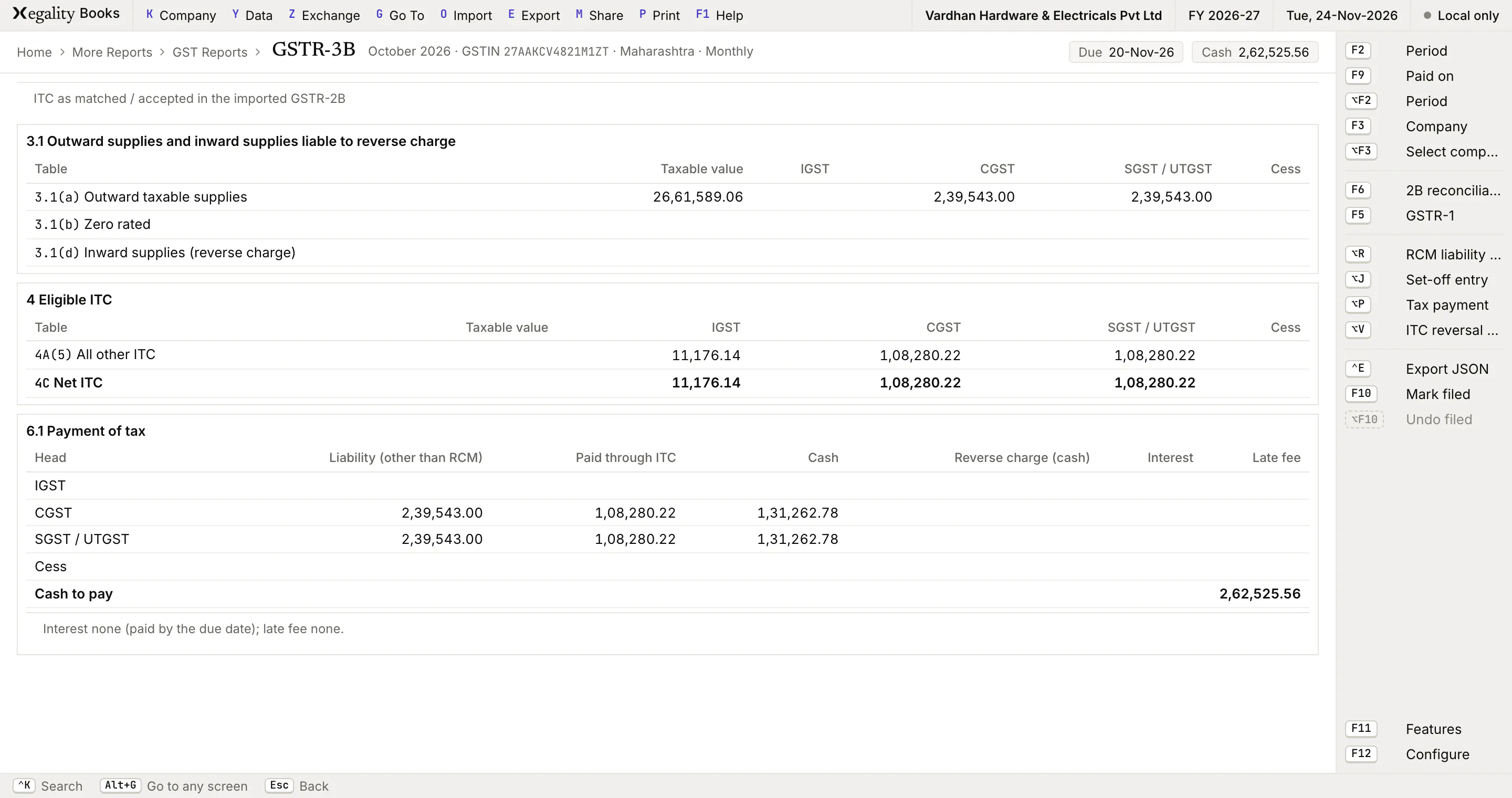
Tax is worked out on each invoice as you type it, so the returns are ready when the month ends — with anything that needs a fix listed, and a key to go and fix it.
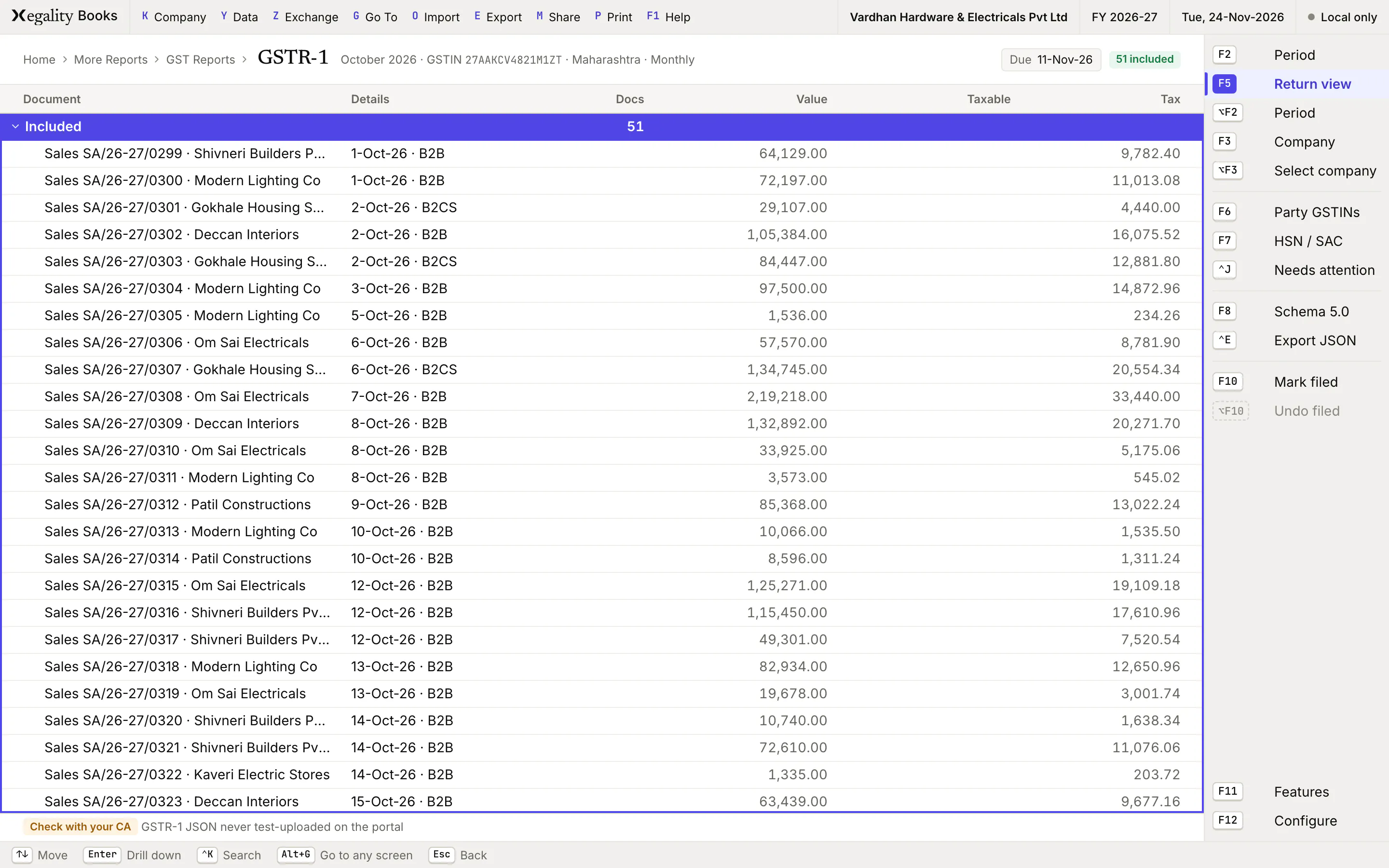
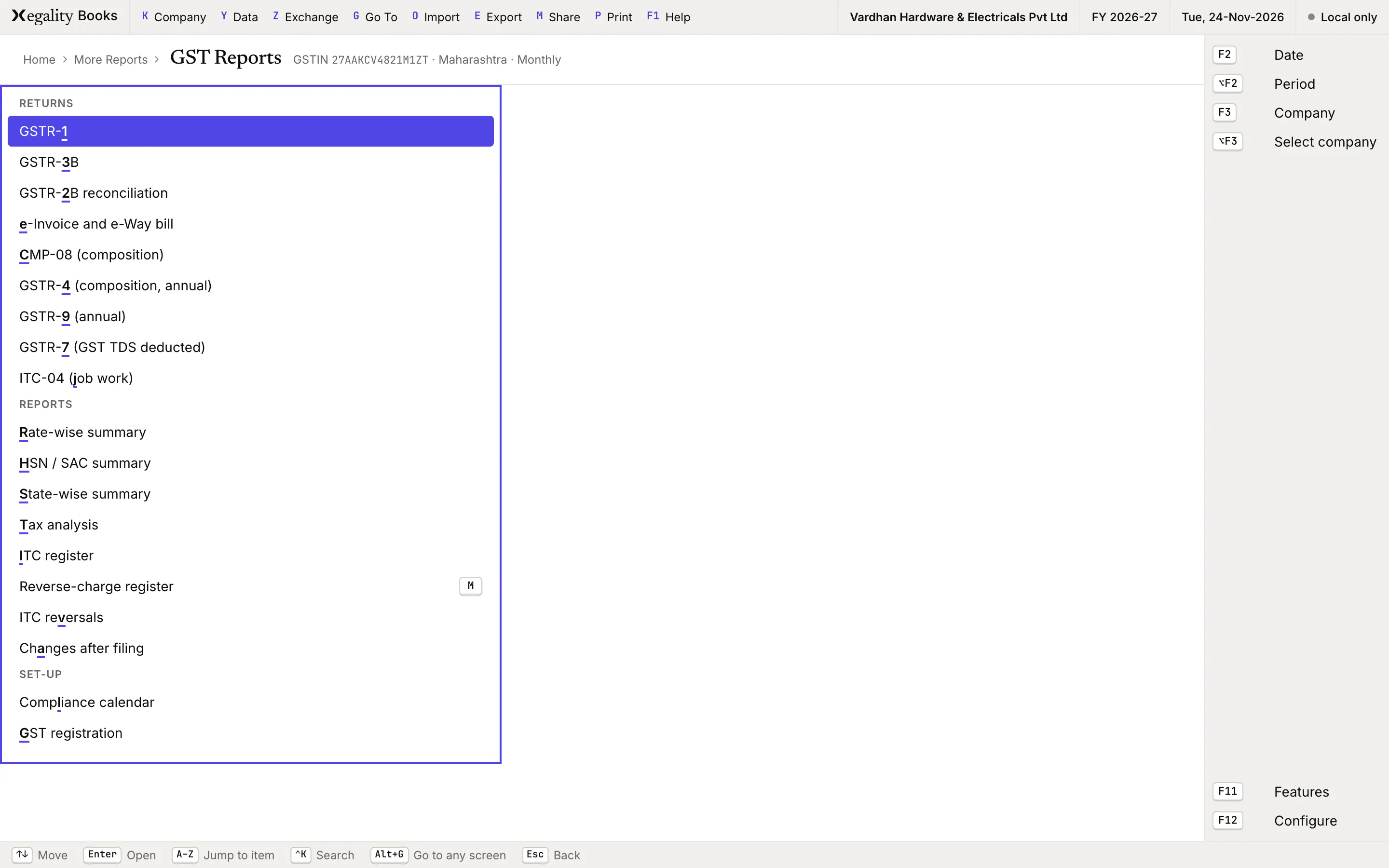
- Tax on every invoice from the item or ledger rate and the place of supply: CGST + SGST within the State, IGST across
- GSTR-1 with every document classed as included, needs attention (with the reason) or not relevant
- GSTR-3B from your vouchers, each figure drillable; JSON export and a filed mark that locks the period
- GSTR-2B reconciliation from the portal's JSON or Excel file, with ITC and IMS decisions per invoice
- CMP-08 and GSTR-4 for composition, GSTR-9 annual, GSTR-7 for GST TDS, ITC-04 for job work
- e-Invoice and e-Way bill JSON in the government formats, HSN / SAC, rate-wise and state-wise summaries
- ITC register, reverse-charge register, ITC reversals, changes after filing and a compliance calendar
- More than one GSTIN in the same company, each with its own returns
Filing, honestly
Books exports GSTR-1, GSTR-3B, e-invoice and e-way bill files in the government formats; you upload them on the portal. It doesn't connect to the GST portals directly yet. Rates and due dates are kept as dated tables, and where a format still needs a check the app says so. Review your returns with your CA before you file.
Deductions and salaries, under both Income-tax Acts.
TDS is worked out on the voucher as you save it, and the right Act and form are picked by date — the 1961 Act up to 31 March 2026, the 2025 Act from 1 April 2026.
TDS and TCS
From the bill to the quarterly statement
- Both Income-tax Acts: payments up to 31 March 2026 under the 1961 Act, from 1 April 2026 under the 2025 Act
- Nature-of-payment and nature-of-goods masters with thresholds; TDS is worked out on the voucher itself
- Lower-deduction certificates, parties without PAN, TDS not deducted, outstanding with interest
- Challans and the challan register, quarterly statements (26Q and the new forms) for the official validation utility
- TCS on sales with its own computation, challans and statements
Payroll
The month's salary in one voucher
- Employees, groups, pay heads and salary structures; attendance and production types
- Payroll for the month in one go, with payslips and a pay sheet
- PF register and ECR file, ESI register and upload file, professional tax and labour welfare fund
- Salary TDS projection under the old or new regime, gratuity and statutory bonus
Bank statements in, matched to your books.
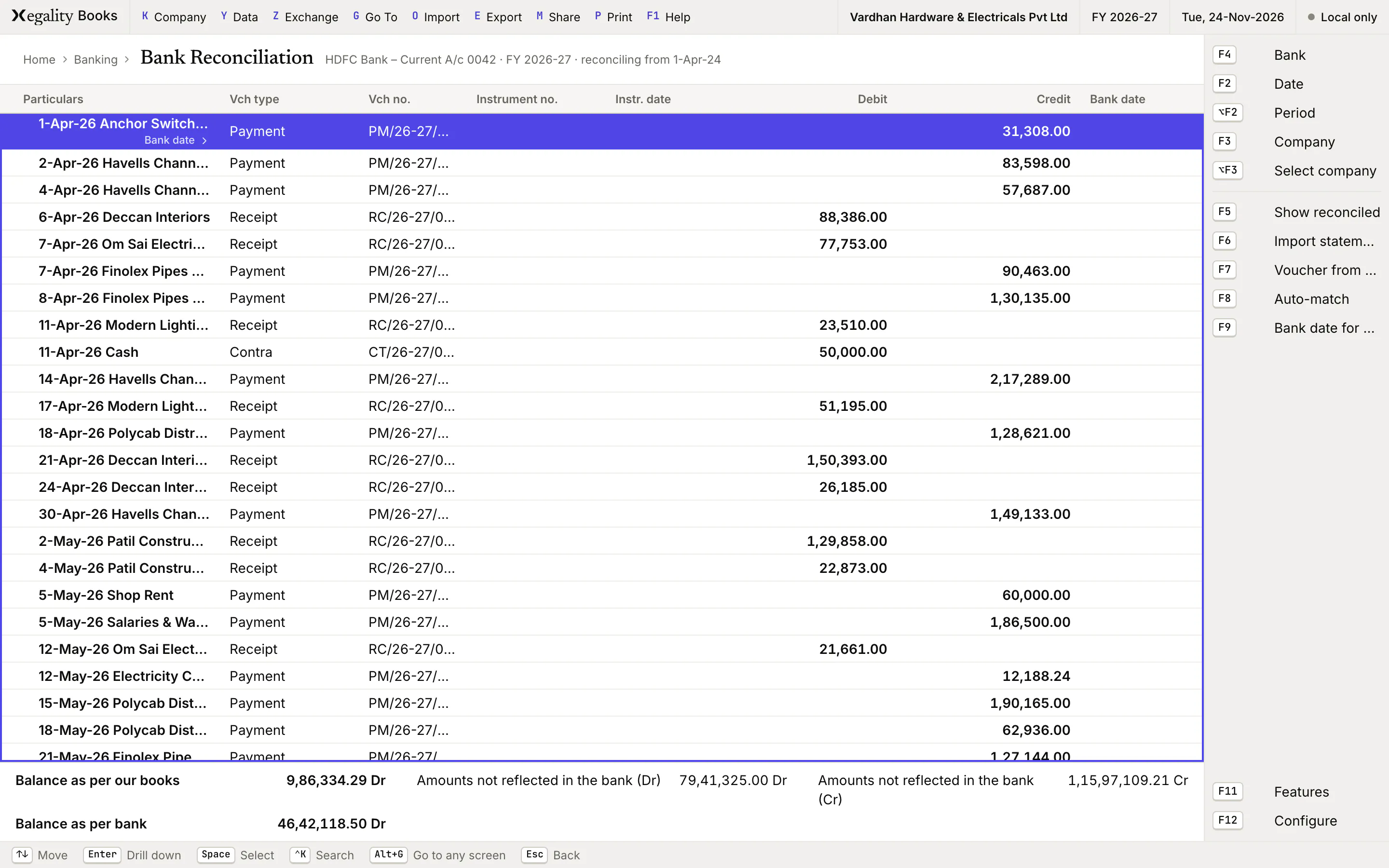
Bring in the bank's statement, let Books match it to your entries, and turn what's left into vouchers.
- Bank reconciliation with bank dates, opening unreconciled items and the balance as per bank
- Import a statement — Excel, CSV or a text PDF — and match it to your entries automatically
- Rules that turn bank lines into vouchers (bank charges, a party's name in the narration …)
- Cheque books and a cheque register, cheque printing on CTS-2010 layouts, deposit slips and payment advice
- Post-dated summary, e-payment files (CSV), recurring vouchers
- Cost centres and categories, budgets and scenarios, foreign currency with exchange gain or loss, interest on parties
Bring your company over from Tally.
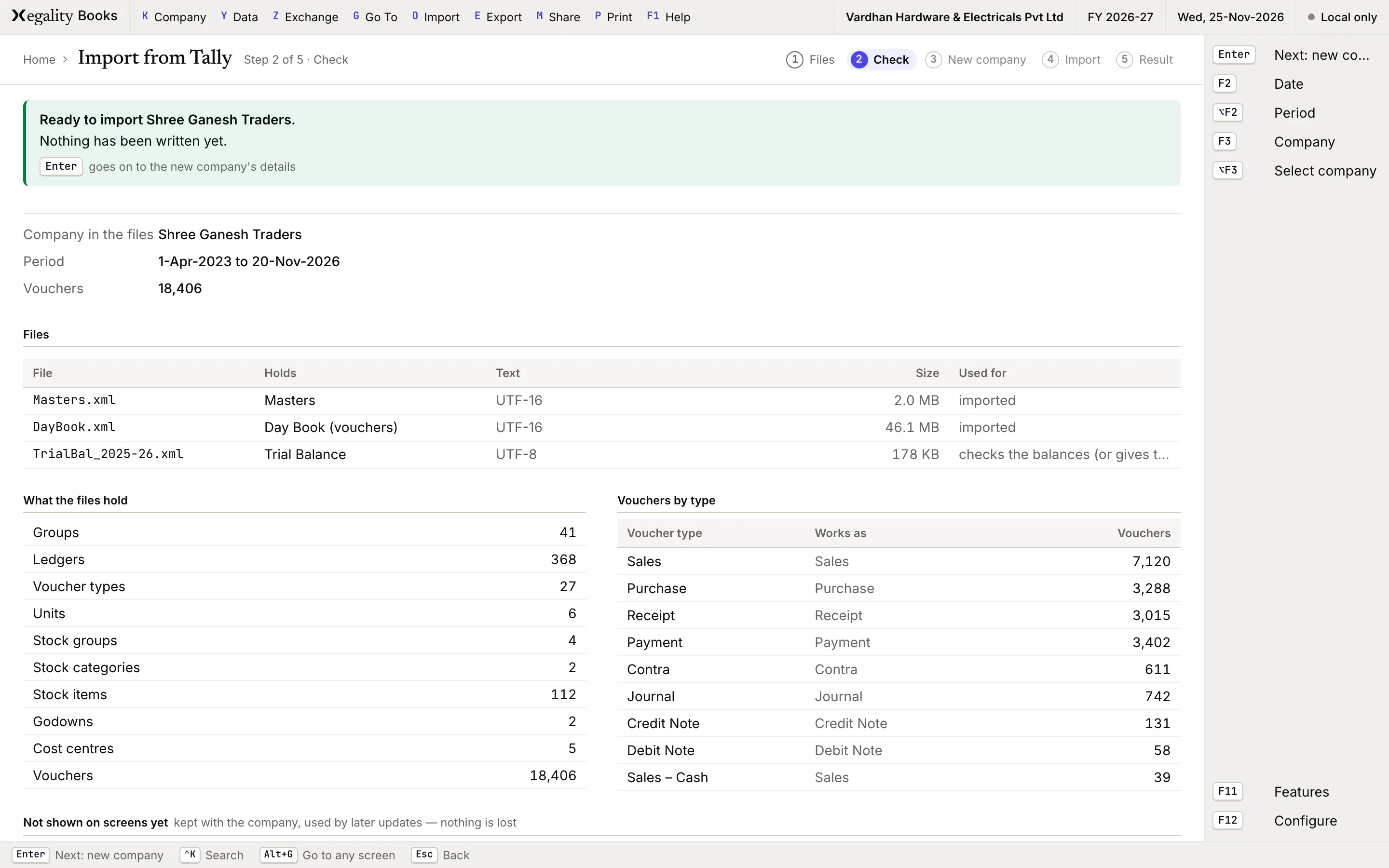
Masters, vouchers and opening balances for every year, checked against the source before you rely on them. And if you ever need to, export back to Tally XML.
- 1
Export from Tally
Export the masters and the Day Book as XML. Add the Trial Balance at each year end (and the Stock Summary if you keep stock) so every balance can be checked.
- 2
Add the files
On the company list choose Import from Tally and drop the files in. Their kind is found on its own, and nothing is written until the files are checked.
- 3
Check year by year
Books creates a new company and compares its Trial Balance with Tally's for each year, so you can see it matches before you rely on it.
- On the desktop, Books can also read straight from Tally running on the same computer.
- Large exports are fine: in the browser, files up to 500 MB upload in checked chunks.
- Bill-wise details, cost centres, stock lines, GST details and payroll lines come across, not just ledger totals.
- Export to Tally XML any time — for a CA who still works in Tally, or to go back.
Tally is a trademark of its owner. Xegality Books is a separate product; it reads and writes Tally's documented XML format.
On your desk, in the browser, in your pocket.
One app in three places. Keep a company on your own computer, keep it online, or both.
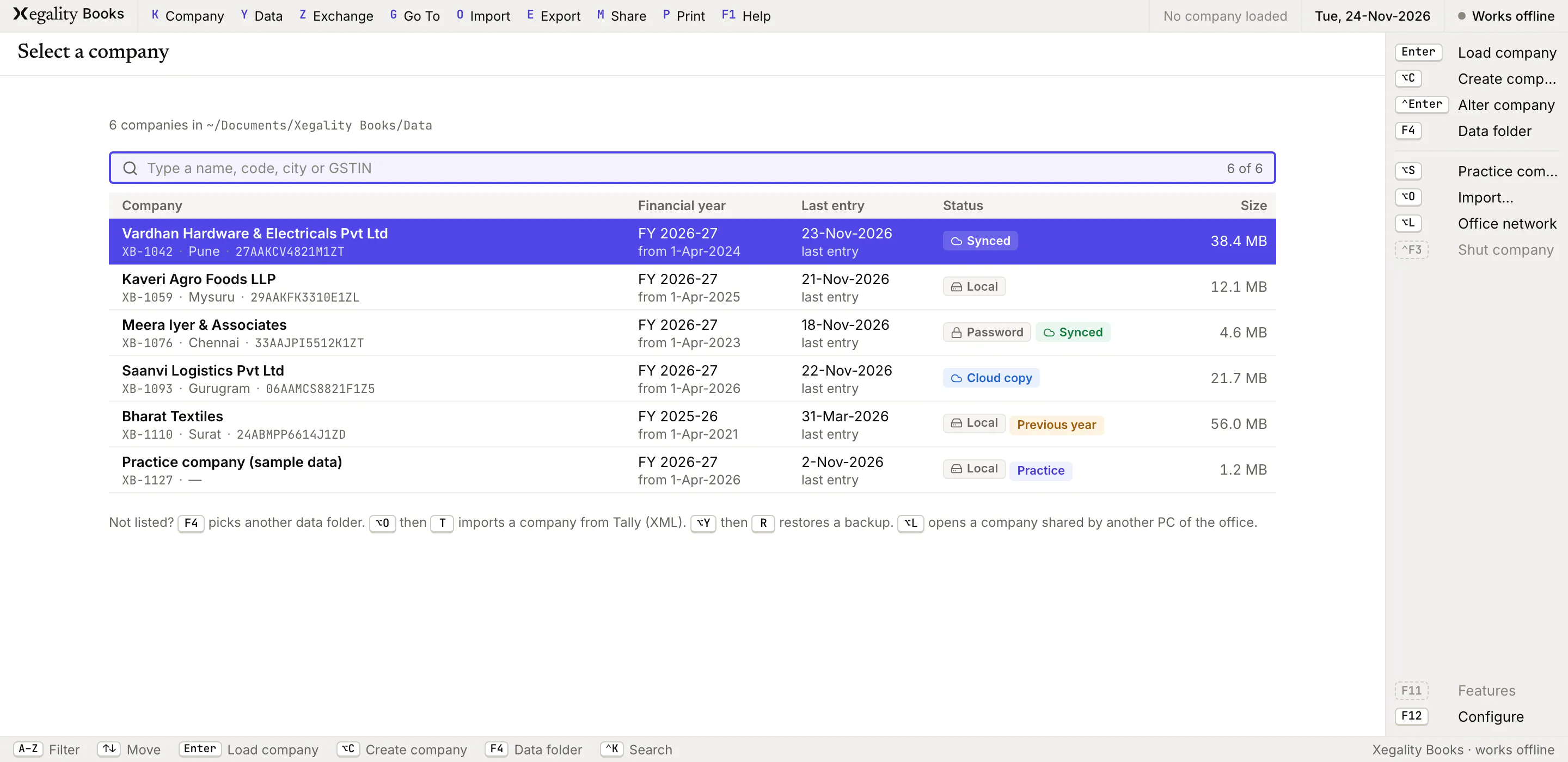
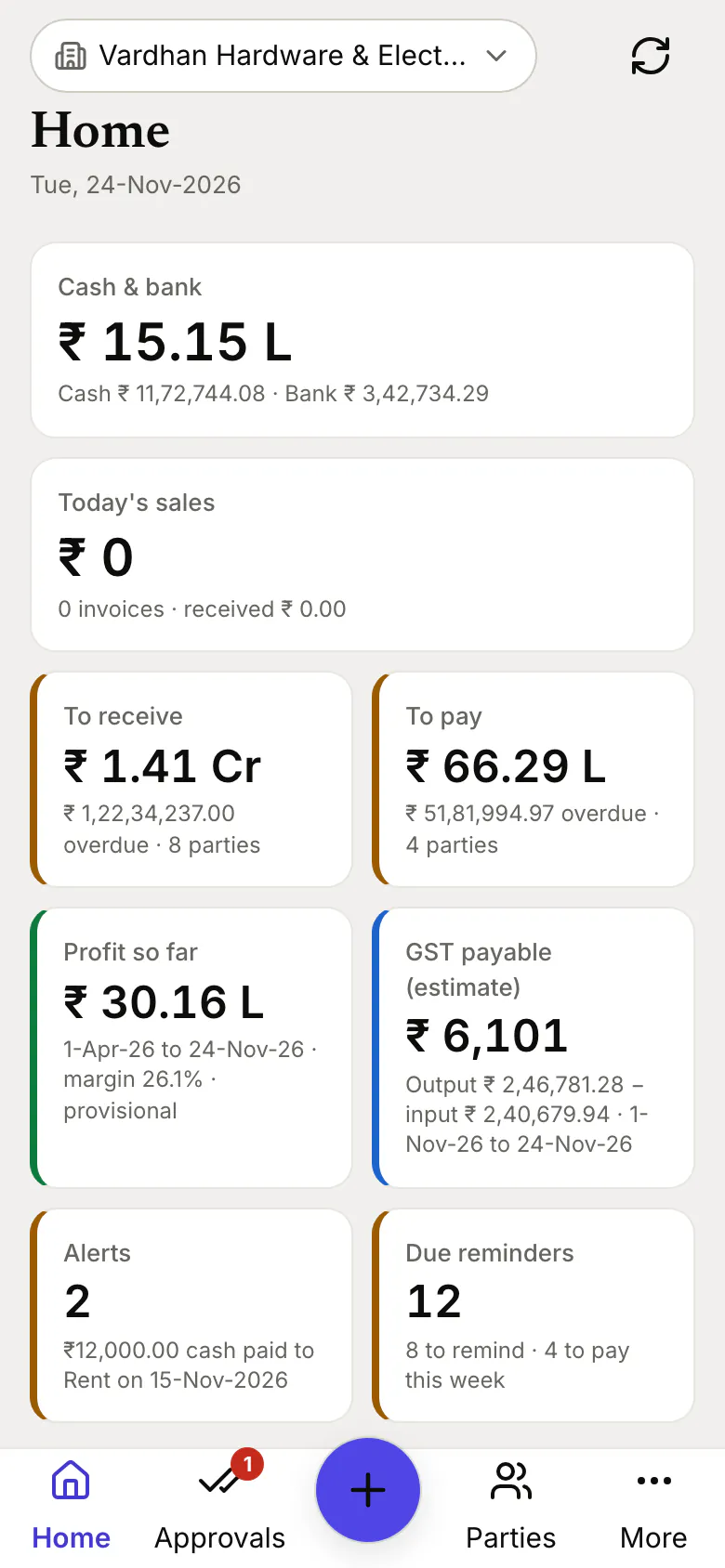
Desktop, offline
Windows, macOS and Linux. Each company is a file on your computer and everything works without internet. The app updates itself.
In the browser
The same app at xegality.com/books with your Xegality account. Companies live on Xegality's servers, are saved as you accept each entry and are backed up automatically.
Sync a PC
Connect a desktop with a one-time code, upload its company once, and from then on only changes travel. Edits made offline sync later; a clash keeps both versions for you to review.
On your phone
Open Books on your phone and it switches to a phone layout you can add to the home screen: figures for the day, approvals, an expense from a bill photo, a quick sale or receipt, and sharing on WhatsApp.
Your accountant and your CA, in the same books.
No more backups on a pen drive. Give each person the access they need and see who did what.
- Invite people by e-mail with a role — Admin, Accountant, Data Entry, Auditor / CA or Viewer — or a custom role with its own rights.
- Your CA sees live books, comments on vouchers, posts adjusting entries that wait for your approval and can lock an audited period.
- Maker–checker: vouchers above a limit, or of the types you choose, wait in an approvals inbox until someone approves them.
- Two people never overwrite each other: a voucher open elsewhere shows who is editing it.
- Every change goes into the edit log with the person's name. Access can be taken back any time.
- Office network: one PC hosts the company and the others connect with a pairing code — no separate server to buy. Traffic between them is encrypted.
AI that suggests. You decide.
The typing-heavy jobs — bills, bank lines, quick questions — done for you as drafts. The books still do every calculation.
Bill photo → purchase voucher
Take a photo or choose a PDF of a supplier's bill. Books reads it into a draft purchase voucher with the file attached, works the tax out again from its own rates and shows any difference from the bill.
Bank lines → vouchers
For bank lines nothing matched, it suggests the ledger and voucher type from the narration and your past entries. Accept one, accept the ticked ones, or change them.
Alerts
Possible duplicates and cash paid over the Income-tax limits are flagged for review, with a note to check with your CA.
Ask in English, Hindi or Hinglish
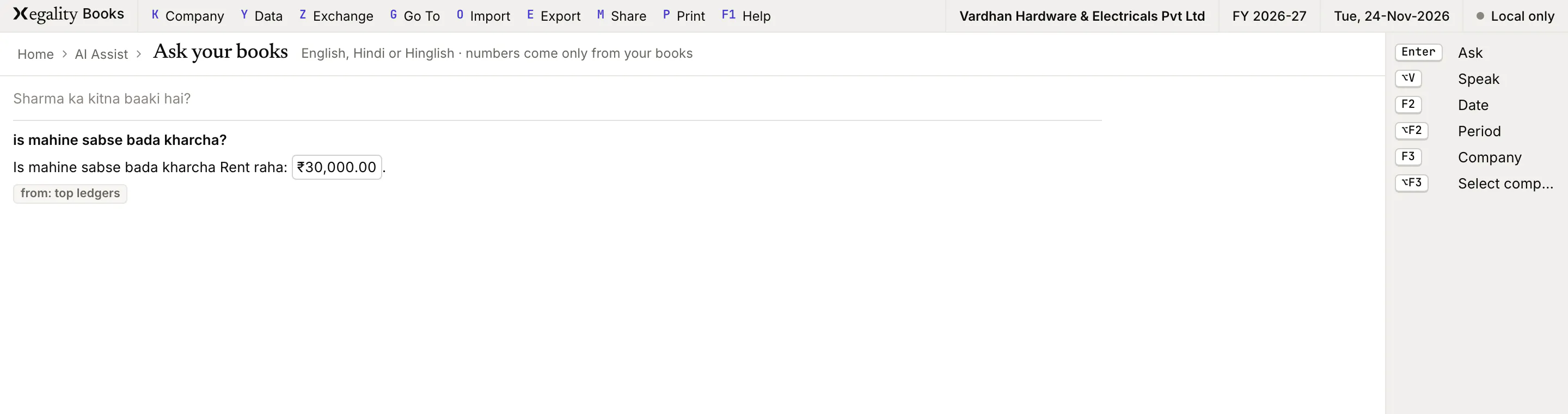
“Is mahine sabse bada kharcha?” — the books work the figure out and the answer links to the report. Numbers only ever come from your books.
Voice entry
Say “Ramesh ko 5000 cash diye rent ke” and a draft payment is filled in for you to check and save.
The rules it follows
- AI is off until you switch it on for a company.
- It only suggests; you accept. It never saves, changes or deletes anything by itself.
- Tax and money are always computed by the books, never by the AI.
- Only what an action needs leaves your computer: a bill you chose, bank narrations with ledger names, or your question with the report lines that answer it.
- AI actions use the AI requests of the Books plan of the business that owns the company (people invited to it use the owner's), not your Xegality plan. Without internet, the rule-based bank matching, alerts and voice rules keep working.
From invoice to payment, without leaving Books.
Print it, send it, get paid, and follow up — each one click from the voucher.
One-click PDF
Invoices, vouchers and reports as PDF, with Hindi, Marathi, Gujarati, Bengali, Tamil, Telugu, Kannada and Punjabi text shaped properly.
UPI QR on invoices
A UPI QR code for the exact amount due, printed on the invoice. It works offline.
WhatsApp and e-mail
Share an invoice on WhatsApp with a ready message, or e-mail it from Books with the PDF attached.
Payment reminders
Rules per party or for everyone — before the due date, on it, every week after — sent by e-mail, with a log per party.
Invoice designer
Arrange sections, item columns, captions, logo, bank details and the QR, with a design for each voucher type.
Report builder
Your own reports over ledgers, parties, vouchers and items, with filters, grouping and period columns, saved for later.
Hindi on screen, eight Indian languages on paper.
- Switch the app between Hindi and English in Settings › Language. Accounting terms are the ones Hindi-medium accountants use: खाता, रोजनामचा, तलपट, नामे / जमा.
- Print each invoice in English, Hindi, Marathi, Gujarati, Bengali, Tamil, Telugu, Kannada or Punjabi, or bilingual.
- Search is Hinglish-friendly: “day book” finds रोजनामचा, and “ramesh” finds रमेश.
Nothing lost, nothing changed quietly.
Every save is checked, logged and backed up, and deleted entries wait in a recycle bin.
Edit log that can't be switched off
Every create, change, delete and restore of every voucher and master, with who and when. Each entry is chained to the one before, and Verify checks the chain.
Recycle bin
Deleted vouchers and masters go to a recycle bin and come back exactly as they were, same date and place in the day.
Automatic backups
A daily backup on your computer, keeping as many days as you choose; companies in the browser are also backed up to the cloud. Restoring is one step.
Verify any time
Verify checks every voucher, every balance and the edit-log chain; the quick check takes seconds. Every save is one transaction, so a power cut never leaves half a voucher.
Locked periods
Lock the books up to a date after audit or filing. A filed GST return keeps its period locked until you start an amendment.
Encrypted in transit
Sync travels over HTTPS, and office-network traffic between PCs uses an encrypted channel set up with a pairing code.
Fast at 1 lakh vouchers. No year-end split.
Saving a voucher stays quick as the company grows, so every year can stay in one company.
- to post 1 lakh vouchers in bulk
- 45.9 s
- to save one voucher (95th percentile) in a 1-lakh company
- 7.7 ms
- to import 1 lakh vouchers from Tally XML, Trial Balance checked
- 58.4 s
- for the full Trial Balance of that company
- 11 ms
Measured by our engineering team on an 8 GB MacBook Air with a test company of 1 lakh vouchers (November 2026). Numbers vary from run to run and from computer to computer.
Start free. Upgrade when the business grows.
Every business starts on Free and can upgrade any time. Prices are per business, in rupees, before GST: 18% GST is added when you pay.
- Free
One company for a small business, with cloud sync.
Create your business account₹0
No card needed
Upgrade any time
- 1 company
- 2 people per company
- 1 GB cloud storage
- 20 AI requests a month
- 50 invoice and reminder e-mails a day
- Desktop ↔ cloud sync
- Host a company on the office network (not included)
- Pro
A few companies, a small team, LAN hosting on the desktop.
Get Pro₹499/month + GST
₹588.82 with 18% GST
Billed monthly
- 5 companies
- 5 people per company
- 10 GB cloud storage
- 300 AI requests a month
- 300 invoice and reminder e-mails a day
- Desktop ↔ cloud sync
- Host a company on the office network
- Business
Many companies and teams, for growing businesses and groups.
Get Business₹1,499/month + GST
₹1,768.82 with 18% GST
Billed monthly
- 25 companies
- 25 people per company
- 100 GB cloud storage
- 2,000 AI requests a month
- 1,000 invoice and reminder e-mails a day
- Desktop ↔ cloud sync
- Host a company on the office network
Pay on the website
Upgrade from your company list and pay by UPI, card or net banking through Razorpay, with a GST receipt for each payment. A plan runs for the month or year you paid for; buy it again to extend it. Switching plans counts the unused days of a paid one.
Back to Free, nothing lost
When a paid plan ends, the business goes back to Free. Your companies, entries and people stay as they are; adding more than Free allows waits until you upgrade again.
Your team and CA need no plan
Only the business that owns the companies has a plan. People you invite — your accountant, your CA — sign in with their own Xegality login, with no business account or plan of their own.
AI from the Books plan
AI actions use the AI requests of the plan of the business that owns the company, not anyone's Xegality plan. The rule-based parts work without them.
Download the desktop app, or open it in your browser.
The desktop app works fully offline and keeps each company on your computer. It opens the backups you download from your company list, and it updates itself.
Windows
Windows 11 and Windows 10. Installs for one user without admin rights; an MSI for IT departments and an offline installer for PCs that are never online. Until our code-signing certificate has built up reputation, SmartScreen may warn the first time (More info, then Run anyway).
macOS
Separate builds for Apple silicon and Intel Macs, macOS 10.15 or later. Signed with our Apple Developer ID and notarized by Apple, so it opens like any other app.
Linux
AppImage (updates itself), .deb and .rpm, for Ubuntu 22.04, Debian 12, Fedora 38 and newer.
Phone
No app store needed: open xegality.com/books on your phone and add it to the home screen.
Questions people ask about Books.
Still curious? Talk to our team.
Is Xegality Books the same as Tally?
How do I move my company from Tally?
Does it work without internet?
Where is my data kept?
Can my CA work on my books?
Can several people in the office work at the same time?
Which computers does the desktop app run on?
Windows or macOS warned me about the installer. Is that expected?
Are the GST, TDS and payroll files ready to file?
What does the AI see, and can it change my books?
Can I use it in Hindi?
Is it fast with a big company?
What if I delete something by mistake?
What does it cost?
Do I need a business account?
Is signing in to Books separate from Xegality?
How do I pay, and what happens when a plan ends?
Open your books in a minute.
Create a company or import one from Tally, in the browser or on the desktop. The practice company is there to try every screen first.